

error Please make sure to choose the correct service! For the some models, you will need a Windows PC & USB cable. If you are not sure which service is right for your device, contact us via live chat for assistance.
Unlock Samsung Phone ANY Model ANY Country
From: $29 USD (1,595 MKD)
- Fast processing — usually completed within 1–24h.
- Unlock any Samsung phone and tablet model.
- Devices that do not request an unlock code can be unlocked remotely via USB (Sprint, Verizon, T-Mobile, and others).
Trusted and reliable service to unlock your Samsung phone by IMEI number remotely with an unlock code. The process is safe, simple, and fast, with a 100% success rate. Simply select the unlocking service and provide the IMEI number of your Samsung device. Once the unlock is complete, you will receive an email containing the Samsung Unlock Code (8 or 16 digit NCK & MCK codes) along with clear step-by-step instructions on how to enter the code and permanently unlock your phone for any network worldwide.
Samsung Phone Unlock – Supported Models & Carriers
We can unlock ANY Samsung phone, including Samsung Galaxy S26 Ultra, S26 Plus, S26, S25 Ultra, S25 Plus, S25, S25 Edge, S25 FE, S24 FE, S24 Ultra, S24 Plus, S24, S23 Ultra, S23 Plus, S23, S23 FE, Z Fold 5, Z Flip 5, Z Fold 4, Z Flip 4, S22 Ultra 5G, S22 Plus 5G, S22 5G, S21 Ultra 5G, S21 5G, S21 FE 5G, Z Fold8, Z Fold8 Ultra, Z Flip8, Z Fold7, Z Flip7, Z Flip7 FE, Z Fold6, Z Flip6, Z Fold5, Z Flip5, Z Fold4, Z Flip4, Z Flip3, Z Fold3, Z Flip2, Z Fold2, Z Flip, Z Fold, Note 20 Ultra 5G, Note 20 5G, S20 FE, S20 FE 5G, S20 Ultra 5G, S20 Plus 5G, S20 5G, Z Fold 2, Z Flip, Fold, Note 20, Note 20 Ultra, Note 10+, Note 10, Note 10+ 5G, S10, S10+, S10E, S10 5G, Tab S7, S6, S5, S4, Xcover, A90, A80, A70, A71, A60, A50, A51, A52, A53, A54, A55, A56, A57, A42, A41, A40, A30, A32, A37, A36, A35, A20, A21, A22, A23, A25, A26, A33, A10, A11, A12, A13, A14, A15, A16, A17, A02S, A02, A03S, A04, A05, A07, S9, S9 Plus, Galaxy S8, S8+, Note 9, Note 8, Note 7, Note 5, Note 4, Note 3, S7, S7 edge, S6, S6 Edge, A8, A6, A5, A3, S5, S4, J7, J7 Prime, J5, J3, Alpha, and many more.
This service also works with ANY carrier worldwide, including AT&T, Sprint, Boost, Xfinity, Spectrum, Cricket, Verizon, Metro PCS, T-Mobile, Mint, TracFone, Straight Talk, Net10, Total, US Cellular, Ting, Visible, Rogers, Telus, Bell, Vodafone, O2, EE, Claro, Movistar, Airtel, Netcom, Telia, Telenor, Sunrise, Swisscom, Orange, Three, A1, and many other carriers around the world.
Benefits of Choosing Our Samsung Unlock Service
- Fast code delivery and affordable unlocking prices.
- Permanent unlocking solution — your phone stays unlocked forever.
- Remote Samsung unlock service via IMEI or USB (depending on the carrier).
- No software required in most cases — simply enter the unlock code.
- Update your Android version without the phone relocking.
- No rooting and no flashing — we use official Samsung solutions.
- Warranty remains valid — unlocking does not void it.
How to Locate the IMEI Number on Your Samsung Phone
You can find the IMEI number of your Samsung phone by dialing *#06# or by going to Settings → About phone.
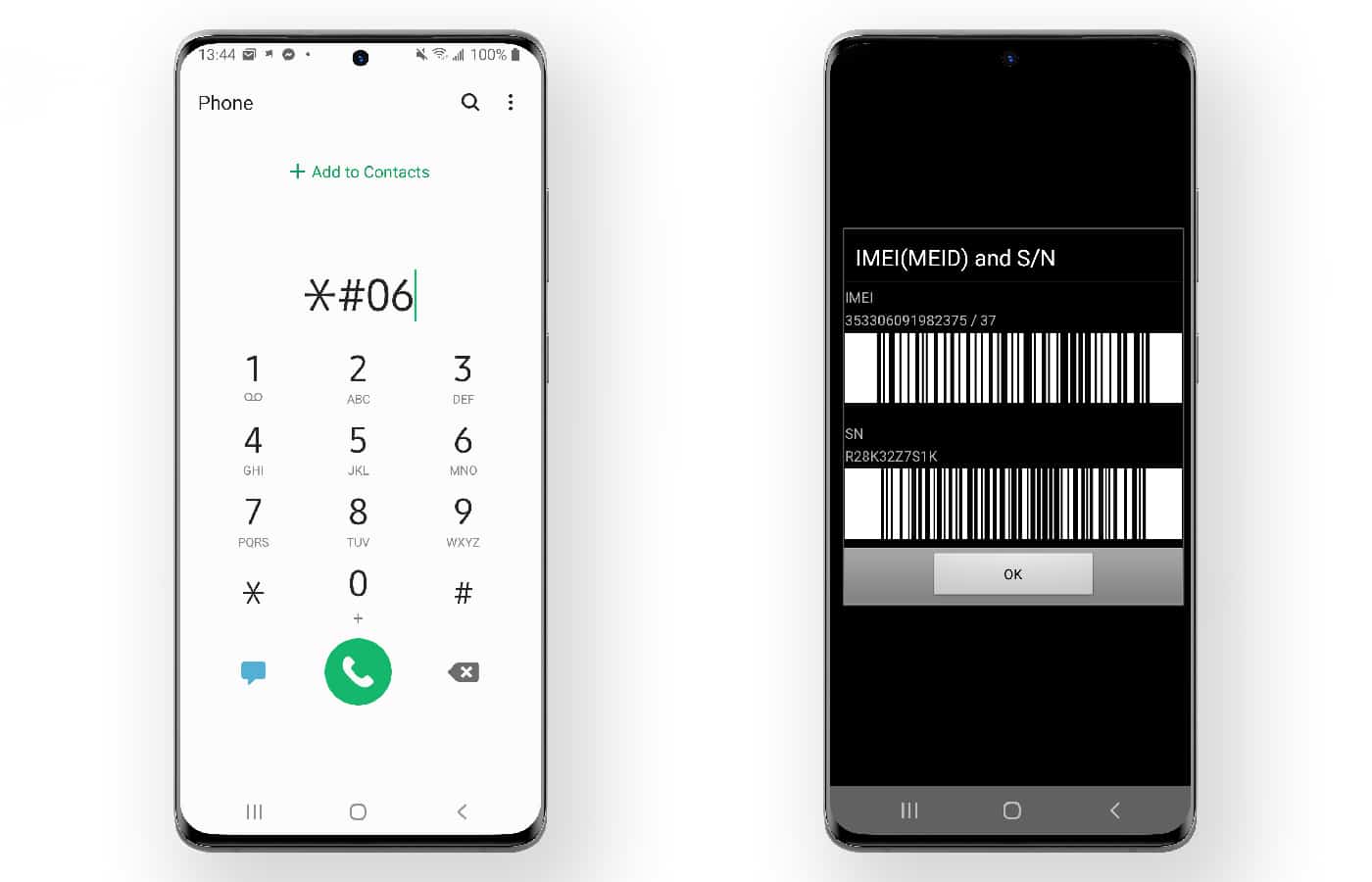
Alternatively, you can find the IMEI under the battery (on Samsung phones with removable batteries).
The Samsung unlocking procedure is very straightforward. Simply enter the unlock code you receive by email. The process is 100% legal, and UnlockBoot offers the lowest prices available.
How to Enter the Samsung Unlock Code on Your Device
After receiving the email from us, insert a non-accepted SIM card into your Samsung phone and power it on. The phone will prompt you for the SIM network Unlock PIN — enter the Samsung Unlock Code from the email.
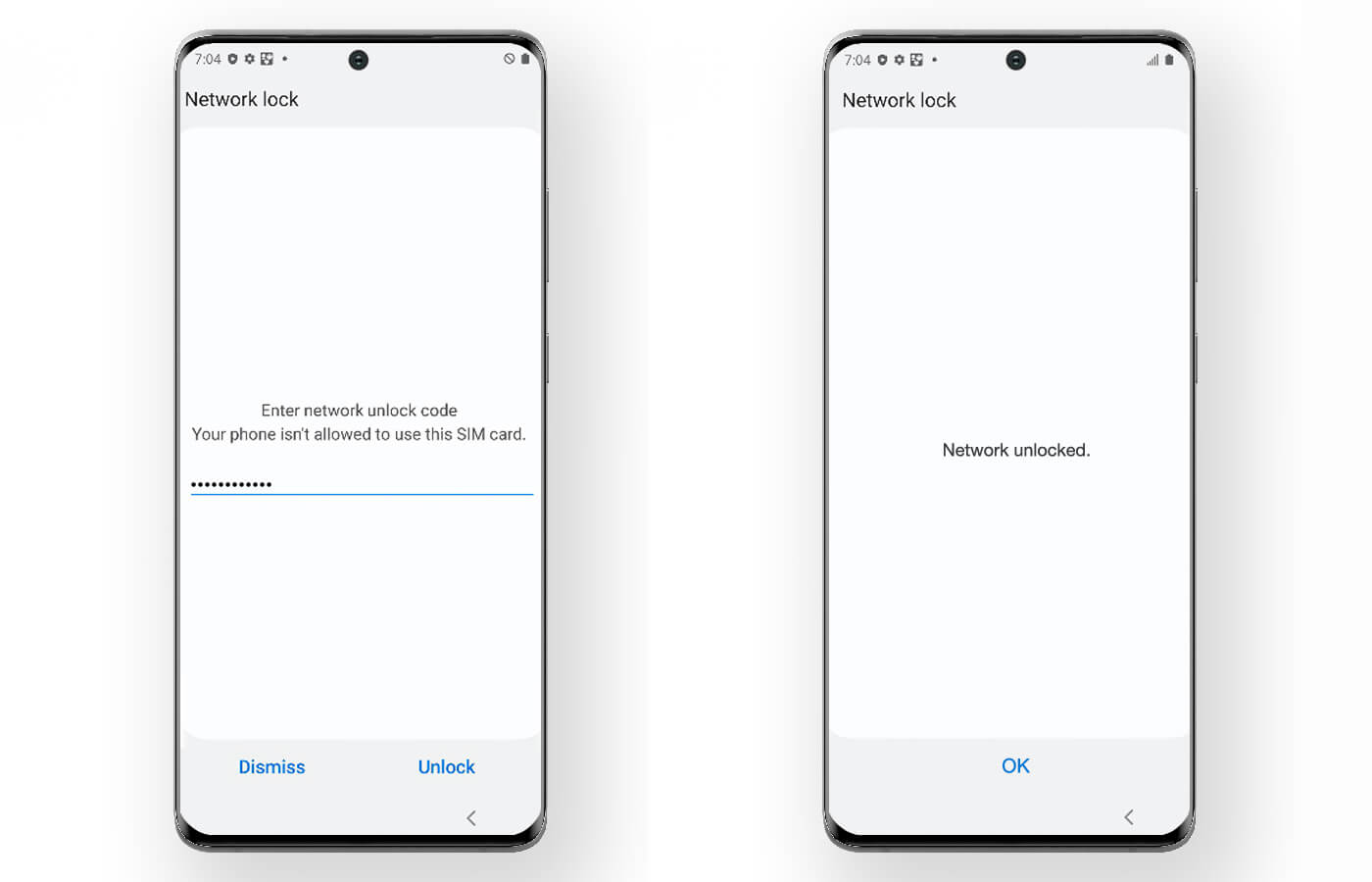
You will then see the message “Network Unlock Successful.” Your phone is now permanently unlocked and can be used with any SIM card and GSM network in the world.
Step-by-Step Video: Unlock Your Samsung Phone Using the Code
Step-by-Step Video: Remote Unlock Process (Sprint, Boost, Verizon, T-Mobile, Region Lock & More)
For the remote unlocking service you will need a Windows PC and a USB cable. The remote USB unlock is performed live in 10–30 minutes after we connect with you. No rooting or flashing is involved, and your warranty remains valid.
In most cases your data will not be wiped, but we recommend creating a backup before starting the remote USB unlocking process.
Please note that if your Samsung device is running March or April 2026 firmware, the service cost may be higher depending on your region. We recommend contacting our support team via live chat before purchasing. Any incorrect purchases will be refunded as store credit.
If you have any further questions about how to unlock a Samsung phone, feel free to contact us.
18 reviews for Unlock Samsung Phone ANY Model ANY Country
Add a review
You must be logged in to post a review.
Related products
d273030 –
Excellent service! I got the unlock code in 8 hours. Thank you very much!
William –
Excellent service. After chatting for a few minutes with unlockboot support I went in and placed an order. They explained the process, connected to my PC, and in about 10 minutes I had an unlocked Samsung Galaxy S9+! Really fast service, I can’t praise it enough.
Victor –
Quick response and solved my problem. My Sprint Galaxy S9+ was locked and they unlocked in less than 20 minutes. Highly recommend.
Bryan –
Got my Verizon S10 5G unlocked in less than 10 minutes. Amazing and fast service. Thank you.
apark7163 –
Great support and easy process. I have a AT&T Samsung Galaxy fold, I tried 2 other unlocking websites, the first failed after 4 days. The 2nd website kept saying “wait few more days”. and it took 2 weeks already. It was hopeless. Then I found unlockboot, they answered in a minute through the live chat. I placed an order and they unlocked my phone instantly through PC. I wanna give them 999 stars if I could. Thank you guys!
simmaxim2 (verified owner) –
This guys very professional !!!
Mohamad Rebal Alsaleh (verified owner) –
Excellent service! I got the unlock code in 1 hours
Note 10Plus (N975U)
🙂
Marshall Martin (verified owner) –
Took 4 hours but they unlocked my samsung galaxy s9 plus for $55. I was skeptical to spend $55 but it worked.
John Davis (verified owner) –
Quick service, My S10+ was unlocked in 5 minutes. The support person was very helpful and wonderful. I would recommend UnlockBoot or other or use in the feature. Great job!
nitai.alexandar –
They unlocked my T-Mobile S26 Ultra in less than an hour. My phone was locked with T-Mobile showing the message “Please contact T-Mobile to unlock the device.” I searched on YouTube and found the UnlockBoot website — it was an amazing service. I installed the USB Redirector tool, connected my phone to the PC, and they completed the unlock very quickly. Thanks again!
dutka96 (verified owner) –
I’ve used these guys several times now and have unlocked multiple phones with them. The service is always very fast and reliable, which is why I keep coming back whenever I need to unlock another device. Highly recommended!
Taja Brown (verified owner) –
Class service had my s10 plus over a year and couldn’t find any way of unlocking it until I found these guys best in the game highly recommend
Anthony Hubert (verified owner) –
Samsung Galaxy S24. Resolved in minutes. I ordered in the early morning hours, so it took me a little while to get the email and start the process, but after that it was a breeze. A live chat tech did most of it remotely on-screen. Money well spent. Thanks guys!!
akin_613 (verified owner) –
They just remotely unlock my Tmobile/sprint Samsung A13 5G. The whole process took less than 10 minute. Five STARS +++++
Denis Waweru (verified owner) –
Excellent. At first the server was offline and I was frustrated that they couldn’t remove the Google FRP. Later I was able to chat with Stephan from UnlockBoot and he unlocked my phone within 2 minutes.
Thanks alot.I highly recommend it
Ubel Rodrigues de Freitas Neto (verified owner) –
Amazing service! Just a little wait because we’re in different time zones but the service it self was perfect! Thanks!
marcelsteenkamp3 (verified owner) –
Awesome service! The support team was always friendly and professional. It took a little longer than expected, but it was over the festive season so I was fine with the wait. Every time I asked for an update, they gave me a clear and detailed explanation for the delay. Thank you!
Curt Strehlau (verified owner) –
S25 ULTRA FRP UNLOCK ! successful, fast, Great service, Best rate and value, 100% recommend this serice, THANK YOU!